7 SerpClix Alternatives Mistakes to Avoid With Any CTR Tool
You paid for CTR visits and have nothing to show for them. When a tool cannot prove a click happened, you are guessing at whether your spend moved a keyword or just drained credits.
This article walks through seven mistakes that sink SerpClix alternatives, from skipping visit proof to mismatching desktop and mobile campaigns. By the end, you will know how to vet any CTR tool on screenshots, platform coverage, targeting, credits and tracking, and decide whether CTRTool fits your campaigns.
What Is CTRTool and Who It Serves
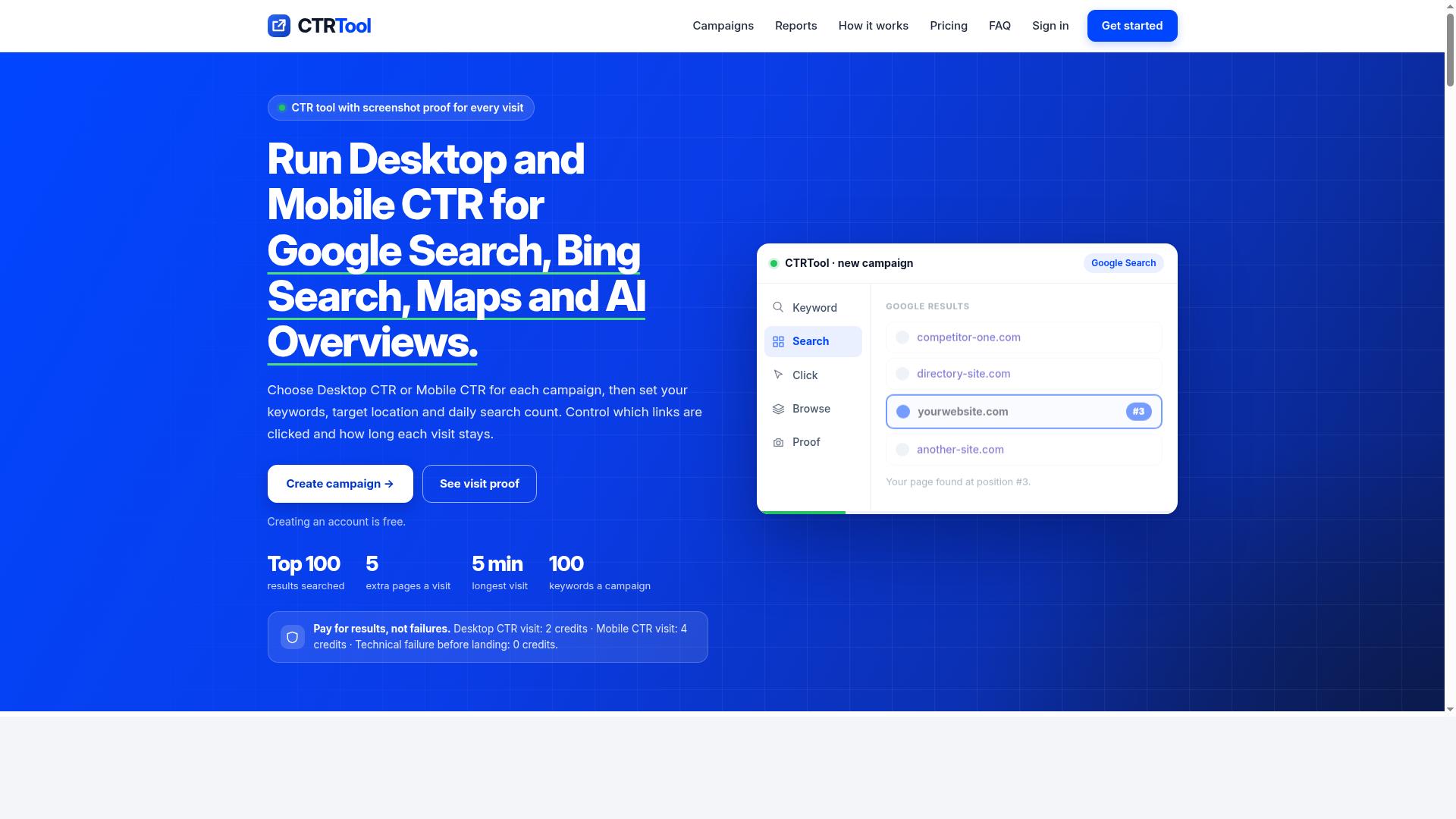
CTRTool is a CTR campaign tool that runs Desktop and Mobile click campaigns for Google Search, Bing Search, Maps, and AI Overviews, each visit backed by screenshot proof. It is a SaaS platform built for SEO practitioners and agencies who want to influence click-through rates on search results.
The product covers the surfaces where modern search visibility happens. That includes traditional organic listings on Google and Bing, local results on Maps, and the newer AI Overviews area. Each campaign is set up as either a Desktop or Mobile campaign, so behavior can match the device a real searcher would use.
Setup is campaign based. Users choose the keywords to target, set the target location, and define a daily search count. They also control which links get clicked and how long each visit stays on the landing page.
Every visit is documented. CTRTool captures a search screenshot and a landing screenshot as proof, so users can review what actually happened rather than trusting a dashboard number alone.
- Search coverage: Google Search, Bing Search, Maps, and AI Overviews
- Device options: separate Desktop and Mobile campaign types
- Campaign controls: keywords, target location, daily search count, clicked links, visit duration
- Verification: search and landing screenshots for each visit
The audience is specific. CTRTool serves SEOs and agencies running campaigns for their own sites or for client properties. These are teams that already understand SERP behavior and want a structured way to test how click activity interacts with their rankings.
It is not positioned as a guaranteed ranking solution. The site itself states that automated visits do not guarantee rankings, which sets a realistic expectation for anyone evaluating the tool. For practitioners weighing it against SerpClix-style paid-to-click options, that clarity matters, and it is the lens for the mistakes covered in the rest of this article.
Do SerpClix Alternatives Really Work? CTRTool's Answer
SerpClix and similar paid-to-click platforms promise CTR manipulation, but their effectiveness hinges on whether visits look real and can be verified. CTRTool addresses both with a proof-first model.
A PTC platform pays users to click ads and search results, and the alternatives that have appeared since vary widely in quality. Many look convincing on paper yet fall apart under scrutiny because the underlying traffic is unverified, proxied, or plainly robotic.
That is the gap CTRTool was built to close. Instead of asking you to trust a dashboard number, it treats every campaign visit as something that must be proven with evidence. The subsections below explain why so many tools fail, then show how that proof-first approach sidesteps each failure.
The mistakes that make any CTR tool fail
Most CTR tools fail for predictable reasons: traffic that looks automated, no proof of actual visits, and behavior that ignores dwell time, scroll depth, or mouse movement. Search engines have spent years learning to spot exactly these patterns.
The most common failure modes tend to cluster around a few recurring problems:
- Click farms and bot traffic, where clicks arrive from scripts or paid workers with no genuine browsing behavior behind them.
- Weak proxy networks with poor IP rotation, so many visits trace back to the same ranges or data-center addresses.
- Unconvincing fingerprints, including sloppy user agent spoofing and browser fingerprinting that contradicts the claimed device.
- Ignoring behavioral signals such as bounce rate, session duration, and scroll depth, which leave a visit looking nothing like organic traffic.
- No transparency, meaning no screenshots and no visit paths, so you cannot confirm a single click ever happened.
When these signals stack up, search engines may discount the activity or treat it as manipulation. The result is wasted spend and, in the worst case, ranking fluctuations that hurt rather than help. Without evidence, you cannot even tell which outcome you got.
How CTRTool's screenshot-proof model avoids them
CTRTool counters each failure mode by requiring screenshot proof for every visit, recording full visit paths, and tracking keyword positions over time, including Maps listing order and AI citation order. That turns a vague promise into something you can actually inspect.
Each campaign visit generates search and landing screenshots as separate proof images, so there are no blind clicks and no unverified traffic. You can review the full visit path rather than a single summary line, which makes it clear what happened between the search and the landing page.
Campaigns are configured with behavioral parameters such as dwell time and scroll depth, which addresses the behavioral-signal mistake directly. Visits can run up to 5 minutes with up to 5 additional internal pages, giving each session a more natural shape.
The commercial model reinforces the same principle. CTRTool uses a pay-for-results credit model with no credits charged for technical failures before landing, and visits that cannot verify the requested location use no credits. One credit balance is shared across all campaign types, websites, and keywords, with up to 100 campaigns of 100 keywords each, and unused credits roll over while subscribed.
The verdict is clear: where other tools leave you guessing, CTRTool gives you proof. That is what makes it a credible answer to the question this section opened with.
Mistake 1: Skipping Proof - Why Every CTRTool Visit Includes Screenshots
Without proof, you cannot distinguish a real visit from a failed one-which is why CTRTool captures search and landing screenshots for every single visit. Many CTR tools simply report a click count and leave it at that. You see a number rise, but you have no way to confirm what actually happened on the other end.
That gap creates a serious blind spot for any campaign. A click may be logged while the wrong keyword was searched, or the landing page may never have loaded at all. When there is no evidence, you are trusting a dashboard instead of verifying results.
This matters even more when you are paying for activity. If a tool bills you for visits you cannot inspect, you have no basis for a dispute and no way to spot patterns of failure early. Unverifiable reporting turns a measurable campaign into guesswork.
CTRTool closes that gap by treating proof as a core part of the service. Every visit includes separate search and landing screenshots, giving you two distinct proof images per visit. These are stored so you can return to them later for review.
Here is what those two images let you confirm:
- The search screenshot shows the query that was used, so you can verify the correct keyword was targeted.
- The landing screenshot shows the destination page as it appeared, confirming it actually loaded.
- Both images are kept for later review, so an audit does not depend on memory or a live session.
Using the screenshots to audit a campaign is straightforward. Pick a sample of visits and check that the search image matches your target keyword and the landing image matches the expected page. If either image looks off, you have a concrete starting point for troubleshooting instead of a vague suspicion.
This is also where CTRTool's full visit paths add context. Visits can run up to 5 minutes and include up to 5 additional internal pages, so the path gives you the wider journey while the screenshots anchor the key moments. Together they let you trace what happened from search to landing and beyond.
The proof is included by default, not sold as an add-on. You do not need to enable a special setting or upgrade to see evidence of a visit. That design choice reflects a simple principle: verification should be the baseline for any CTR tool, not a premium extra.
It also connects to how CTRTool handles billing. The platform uses a pay-for-results credit model, and no credits are charged for technical failures that occur before landing. Visits that cannot verify the requested location use no credits either. When proof is built in, those policies are easier to trust because you can check the underlying evidence yourself.
The takeaway for anyone comparing SerpClix alternatives is to treat proof as a pass or fail question. A CTR tool that reports clicks without evidence leaves you unable to audit, unable to troubleshoot, and unable to hold the service accountable. CTRTool answers that question up front with search and landing screenshots on every visit.
Mistake 2: Ignoring Platform Coverage - Google, Bing, Maps and AI Overviews in One Tool
Limiting your CTR campaigns to Google Search alone leaves Bing, Google Maps, and AI Overviews untouched-CTRTool covers all four in a single platform. That matters more than many campaign managers realize, because each surface behaves differently.
Bing's ranking patterns and click behavior differ from Google's. A local Maps listing is judged by different signals than a blue organic link. AI Overviews introduce a citation layer that did not exist a few years ago. Running one strategy across all of them, or ignoring some entirely, creates inconsistent tactics and muddled results.
The bigger problem is fragmentation. When you run a separate tool for each surface, you split budgets, split reporting, and split your attention. Each tool may handle proxies, timing, and device targeting differently, which makes it nearly impossible to compare keyword rankings or organic traffic movement across surfaces with any confidence.
CTRTool avoids that split by offering four campaign types in one place:
- Google Search CTR: searches a keyword and clicks the organic result, on Desktop or Mobile, across the Top 100 results, including internal pages.
- Bing Search CTR: the same keyword-and-click flow applied to Bing.
- Google Maps CTR: finds a business listing and clicks its website link, with city targeting.
- AI Overview CTR: finds your website in the overview and clicks its source link.
Two of these have specific requirements worth planning around. Maps campaigns check up to 50 listings, which is roughly five pages of results, so a listing buried deep needs that depth accounted for. AI Overview campaigns require a matching citation: the overview must actually reference your site before a source link can be clicked.
Reports reflect the same breadth. CTRTool tracks search positions, Maps listing order, and AI citation order over time, so you can see movement on each surface rather than guessing. For anyone migrating from a PTC platform like SerpClix, that unified view is the difference between scattered activity and a coherent click-through rate strategy.
Mistake 3: Mismatching Desktop and Mobile Campaigns
Running desktop clicks for a mobile-first audience, or vice versa, wastes credits and skews your CTR data, so CTRTool lets you choose Desktop CTR or Mobile CTR per campaign. That single choice prevents the most common device-level error in any CTR tool: treating all traffic as interchangeable when the search engine results page itself looks different on each device.
Desktop and mobile SERPs are not the same layout. Mobile results are compressed, sit differently on the screen, and attract a different pattern of taps and scrolls. Search behavior differs by device too, from session length to the way users scan a page before tapping a result. A campaign built for one context but delivered to the other produces mismatched traffic that looks like clicks in your reports but behaves nothing like your real audience.
Many tools apply a one-size-fits-all approach. They send whatever device mix their pool happens to supply, leaving you with traffic that does not match your analytics. That mismatch can distort your click-through rate figures and muddy the picture you get from conversion tracking and analytics integration. When the device does not match the visitor, the data you collect says less about your actual market.
CTRTool handles this at the campaign level. For each Google Search CTR or Bing Search CTR campaign, you select Desktop CTR or Mobile CTR, and credits are consumed according to the device you choose. On the Starter plan, that means up to 1,000 Desktop visits or 500 Mobile visits, so the device decision has a direct, visible cost. Delivery is matched to that choice as well: Desktop campaigns run through Desktop Chrome windows, while Mobile campaigns run through real Android phone sessions matched to your target location through managed proxy routes.
Choosing the right device mix should start with your own data, not a guess. Before you launch, review your analytics to see where your audience actually searches and converts:
- Open Google Analytics and compare the desktop and mobile split for your organic search sessions.
- Check Search Console for device-level differences in clicks, impressions, and average position.
- Look at conversion rates per device, since a channel that brings traffic may not bring the same results on mobile.
- Match your campaign device to the device where your audience is strongest, rather than defaulting to desktop.
If your analytics show a mobile-heavy audience, run Mobile CTR campaigns and let the Android phone sessions carry the clicks. If your buyers research on desktop, keep the campaign on Desktop CTR. When both matter, split your budget across two campaigns instead of forcing one device setting to cover everyone. That keeps your traffic patterns aligned with real behavior and keeps your keyword rankings data cleaner.
The same logic extends to how you read results. A campaign delivered to the correct device gives you a more honest view of how your page performs in that context, which matters when you compare impression-to-click ratio across devices or check for ranking fluctuations. Matching device to audience is not a minor setting. It is the difference between data you can trust and credits spent on traffic that never resembled your visitors.
Mistake 4: Poor Keyword and Location Targeting
Broad or misaligned keyword and location settings dilute campaign impact. CTRTool requires the page to rank in the top 100 for the chosen keyword and location, and allows country, state, and city targeting. Get either side of that pairing wrong and your budget goes to work that never lands.
This mistake is easy to make because it looks harmless on the surface. You pick a keyword that describes your page, set a location that covers your market, and assume the clicks will follow. In practice, a mismatch between what you target and where your page actually ranks produces failed visits and wasted credits.
The first trap is choosing keywords your page does not rank for. A keyword may perfectly describe your product, but if your page sits outside the top 100 organic results for that term in the target location, the visit cannot complete as intended.
This is not a minor technicality. Ranking position is the foundation of a valid visit, so a keyword your page has never appeared for is a poor choice regardless of how relevant it seems. The fix is to work from evidence rather than intuition.
- Open Search Console and review queries where your page already earns impressions.
- Prioritize terms where you rank on page two or three, since small ranking gains matter most there.
- Avoid aspirational keywords your domain has never surfaced for.
- Recheck rankings before each campaign, because positions shift over time.
Existing impressions are proof of eligibility. They show the search engine already associates your page with the term, which is exactly the starting point a CTR tool needs.
The second trap is location. Setting a country as broad as possible feels like it maximizes reach, but it can pull in regions where your page does not rank or where your offer means nothing. CTRTool lets campaigns target a specific country and optionally a state and city, or choose Any country to use a mix of supported locations.
That flexibility is useful only when it matches your actual market. A local service business targeting a whole continent wastes credits on visitors who will never convert. A global SaaS product restricting itself to one city cuts off most of its audience.
Align location with where your customers are and where your rankings hold. If your page ranks well in one country but poorly in another, target the first and leave the second alone until rankings improve. The Any country option suits campaigns with genuinely international relevance, not campaigns that simply lack a location decision.
Before launching, run a short checklist. It takes minutes and prevents most wasted spend.
- Confirm the page appears within the top 100 organic results for the chosen keyword.
- Verify that ranking holds in the specific location you plan to target.
- Match country, state, and city settings to your real customer base.
- Review Search Console impressions to confirm demand exists for the term.
Targeting precision is what separates a campaign that moves your click-through rate from one that burns credits on visits that never should have been attempted. Treat keyword and location as a single decision, not two separate settings.
Mistake 5: Overpaying for Failed Visits - CTRTool's Pay-for-Results Credits
Paying for clicks that never happen, or that fail verification, drains budget, so CTRTool uses a credit system tied to successful, screenshot-verified visits. That distinction matters when you compare it with tools that bill per click attempt regardless of outcome. With opaque pricing, you can burn a month's budget on visits that never reached your page.
The core problem is wasted spend on unverified attempts. If a tool charges upfront and never confirms delivery, you have no way to separate real visits from failed ones. CTRTool's model ties each credit to a defined outcome, so the cost of a campaign maps to visits that actually met your criteria.
CTRTool offers monthly plans priced in USD, and each plan includes a set number of credits. Credits are consumed only for visits that meet campaign criteria, such as a page ranking in the top 100 or the correct location being matched. A visit that fails before landing costs nothing.
| Plan | Price | Credits | Up to Desktop Visits | Up to Mobile Visits |
|---|---|---|---|---|
| Starter | $59/month | 2,000 | 1,000 | 500 |
| Growth (Recommended) | $125/month | 5,000 | 2,500 | 1,250 |
| Scale | $399/month | 20,000 | 10,000 | 5,000 |
| Agency | $699/month | 40,000 | 20,000 | 10,000 |
The credit costs are transparent. A Desktop CTR visit costs 2 credits, while a Mobile CTR visit costs 4 credits. A verified search without a match costs 1 credit, and a technical failure before landing costs 0 credits.
That last point is where the waste is cut. You are not paying full price for a session that broke before it reached your page. The structure rewards campaigns that are set up correctly, because credits convert into visits rather than disappearing into failed attempts.
Unused credits roll over while your subscription is active, which gives you room to pace campaigns around ranking fluctuations. They expire when cancellation takes effect, so the rollover is a buffer, not a permanent bank. Creating an account is free, and custom development carries a separate, agreed one-time fee.
The practical takeaway is to check how any CTR tool bills for failures before you commit. A pay-for-results credit model keeps your spend aligned with verified visits instead of click attempts. That is the difference between a measurable campaign and an open-ended bill.
Mistake 6: Not Tracking Keyword Positions and Visit Paths
Without tracking, you cannot tell if a CTR campaign is moving rankings or just burning credits. CTRTool logs keyword positions over time and records full visit paths, so every campaign can be judged on outcomes rather than raw click counts.
Many CTR tools stop at a number: how many clicks were delivered. That figure says nothing about whether the search engine results page shifted, whether the right keywords gained ground, or whether the visits behaved like genuine sessions. Click volume alone is a weak signal, and treating it as the finish line is one of the most common mistakes users make after leaving SerpClix.
Tracking matters because a CTR campaign is a means to an end. The end is better keyword rankings and more organic traffic. If you never compare pre-campaign and post-campaign positions, you have no way to know which keywords responded and which ones need a different approach.
Visit quality matters just as much. A click that lands and leaves immediately tells a different story than a session that moves through several pages. Full visit paths reveal that difference, giving you a view of behavior that a simple click counter cannot provide. Experts recommend judging any campaign on both fronts: rankings and session quality.
CTRTool builds this tracking directly into the platform, so there is no separate dashboard to stitch together. The relevant capabilities include:
- Keyword positions tracked over time, so you can see movement across the life of a campaign rather than a single snapshot
- Maps listing order, which captures local pack positioning that standard rank checks often miss
- AI citation order, reflecting how a listing appears in AI-generated answers
- Full visit paths showing the sequence of pages a visit moves through, with visits lasting up to 5 minutes and up to 5 additional internal pages
Because positions are logged continuously, you can line up ranking changes against the periods when campaigns were active. That turns guesswork into a comparison you can actually read.
Put the data to work in three steps. First, record keyword positions before a campaign starts, then compare them against positions after it ends. Second, identify the keywords that gained the most ground and note what they had in common, such as targeting settings or timing.
Third, adjust targeting based on what the visit paths show. If sessions are short and shallow, revisit the pages being visited. If rankings hold steady while paths look healthy, the campaign is doing its job. Let the evidence drive the next round instead of repeating the same settings by habit.
This tracking is not an add-on. It is part of how CTRTool is built, which means the feedback loop between campaign, ranking, and visit quality stays in one place from the first credit spent to the final position check.
Mistake 7: Choosing the Wrong Plan or Ignoring Campaign Limits
Selecting a plan without understanding credit consumption and campaign limits leads to overspending or underpowered campaigns. CTRTool offers four tiers with clear credit-to-visit ratios, so the right choice comes down to matching plan size to your actual campaign volume.
Credit math matters more than the sticker price. A Desktop CTR visit costs 2 credits, while a Mobile CTR visit costs 4 credits, so the same plan supports very different volumes depending on device targeting. Campaign limits such as ranking requirements and listing checks add another layer to plan fit.
Buying too small starves a campaign of clicks. Buying too large ties up budget in credits you may not burn through before renewal. Unused credits roll over while your subscription is active, which softens the risk of overbuying, but they expire once cancellation takes effect.
Before committing, map your keyword list against expected visit volume per device. That single step prevents most plan-selection mistakes with any CTR tool.
CTRTool pricing: Starter, Growth and Scale
CTRTool offers monthly plans with credits that convert to Desktop or Mobile visits at fixed rates. The table below shows how each tier translates into actual campaign volume.
| Plan | Price per Month | Credits | Desktop Visits | Mobile Visits |
|---|---|---|---|---|
| Starter | $59 | 2,000 | Up to 1,000 | Up to 500 |
| Growth | $125 | 5,000 | Up to 2,500 | Up to 1,250 |
| Scale | $399 | 20,000 | Up to 10,000 | Up to 5,000 |
| Agency | $699 | 40,000 | Up to 20,000 | Up to 10,000 |
Growth carries a Recommended label on the site, which makes it the natural middle ground for active campaigns. Mobile visits consume credits twice as fast as Desktop visits, so a mobile-heavy strategy needs a larger tier to reach the same click volume.
Two smaller credit rules are worth knowing. A verified search without a match costs 1 credit, and a technical failure before landing costs 0 credits, so failed attempts do not drain your balance the way a full visit would.
For plan selection, start with Starter for testing a small keyword set and confirming your targeting. Upgrade to Growth or Scale as volume grows and the credit-to-visit ratio proves out. Agencies managing multiple clients can move up to the Agency tier for the highest visit ceiling.
Every plan includes screenshot proof and tracking features, so the decision rests on volume rather than feature access. Creating an account is free, and custom development is quoted as a separate one-time fee. Note that the site displays limited launch pricing, with prices rising 30% on November 15, so locking in a tier early protects your rate. Matching credits to real campaign volume, device mix and rollover behavior keeps a CTR campaign efficient at any tier.
Who Should Use CTRTool - and Final Verdict
CTRTool suits SEO practitioners and agencies who need verifiable CTR campaigns across Google, Bing, Maps, and AI Overviews, and who value proof over promises. If you have been burned by paid-to-click platforms that report clicks without evidence, this is the audience the tool was built for.
The strongest fit is agencies managing client sites and in-house SEOs running their own properties. Both groups need to show a paper trail when a client or manager asks what a campaign actually delivered. Screenshot proof gives them something concrete to point to.
Frustration with unverified clicks is the common thread among ideal users. Many SerpClix alternatives promise volume but leave you guessing whether real sessions occurred. CTRTool answers that question directly rather than asking for trust.
The key strengths worth weighing before you commit:
- Screenshot proof for each campaign, so results can be reviewed rather than assumed
- Multi-platform coverage spanning Google, Bing, Maps, and AI Overviews
- Device targeting to match how your real audience searches
- Location targeting for campaigns that need geographic relevance
- Transparent pricing, so costs are visible before you spend
These features matter because the mistakes covered earlier in this article, such as chasing cheap clicks with no evidence, become far harder to make when proof and targeting are built into the workflow. An agency running geo-targeted campaigns for a local client, for example, can direct activity to the right region and confirm it happened.
The verdict is balanced. CTRTool is a strong option for teams that prioritize proof and control over raw click volume. The screenshot evidence and targeting options separate it from tools that operate as a black box.
There is one practical requirement to accept. Pages need to rank in the top 100 for the tool to be useful, so it will not rescue content that search engines barely index. That is a reasonable boundary, not a flaw, but it means the tool complements solid SEO rather than replacing it.
It also may not suit buyers who want purely automated, unverified clicks at the lowest possible price. If volume without evidence is your priority, this is not the right match. If accountability is, it likely is.
For questions about fit, pricing, or getting started, contact support at vaibhav@autoblogging.ai. That inbox is the direct route to clarifying anything before you commit to a campaign.
Frequently Asked Questions
What should I check before switching from SerpClix to any CTR tool?
Before switching, confirm the tool supports the campaign types you actually rely on-such as Google Search, Bing Search, Maps, or AI Overviews-and that it provides verifiable proof of each visit. CTRTool was built around screenshot proof for every visit, with search and landing screenshots as separate proof images, so you can audit results rather than take them on faith. Also check how credits are consumed before committing to a plan.
Why is "proof of visit" the most common mistake people make with CTR tools?
Many users judge a CTR tool only by whether clicks were delivered, without checking that the click actually happened on the right keyword, location, and result. CTRTool addresses this by providing screenshot proof for every visit plus full visit paths, so you can confirm the campaign did what you paid for. Skipping this verification step is how budgets get wasted on visits you can't validate.
How do I avoid choosing the wrong campaign type or device setting?
A frequent mistake is running a campaign without matching it to your actual goal-for example, using Desktop CTR when your audience is mobile, or targeting the wrong keyword and location. CTRTool lets you choose Desktop CTR or Mobile CTR per campaign and set keywords and target locations, so configure these deliberately rather than accepting defaults. Remember that the page must appear within the top 100 organic results for the chosen keyword and location.
What should I know about credits and plan limits before signing up?
Misunderstanding how credits convert into visits is a common and costly mistake. With CTRTool, plans are credit-based: the Starter plan is $59/month for 2,000 credits (up to 1,000 Desktop CTR visits or 500 Mobile CTR visits), and the Growth plan is $125/month for 5,000 credits (up to 2,500 Desktop or 1,250 Mobile visits). Map out your expected Desktop versus Mobile volume against these ratios before choosing a plan.
Are there special requirements for Maps and AI Overview campaigns?
Yes-these campaign types have their own rules that users often overlook. CTRTool's Maps campaigns check up to 50 listings (about five pages), and AI Overview campaigns require a matching source link. If your target isn't set up to meet these conditions, the campaign can't deliver the visit you expect, so verify eligibility first.
How can I tell whether a CTR tool is actually moving my keyword positions?
Don't rely on gut feeling-track positions over time and compare them against the visits delivered. CTRTool tracks keyword positions over time, including Maps listing order and AI citation order, which gives you a clearer picture of whether campaigns are having the intended effect. If you need help interpreting results, you can reach support at vaibhav@autoblogging.ai.